











How to Install the 8K IPTV App on FireStick
Watch live TV, sports, movies and series with the free 8K IPTV App on FireStick. Follow this step-by-step guide with real screenshots and start streaming in about 10 minutes.
Quick answer: to install the 8K IPTV App on FireStick, install Downloader, enter the code 6883465, allow Downloader to install unknown apps, then install and open the app. Finally, add your playlist with the username and password from your IPTV provider.
In this guide
What Is the 8K IPTV App on FireStick?
The 8K IPTV App (also shown as 8K Player) is a free IPTV player. It does not include channels by itself: you sign in with Xtream Codes API details or an M3U playlist, and it organizes your IPTV service into Live TV, Movies and Series with a built-in TV guide.
4K Quality
Smooth HD, Full HD and 4K playback with a clean, fast interface.
Live TV & VOD
Live channels, movies and series together in one simple app.
TV Guide (EPG)
See what is on now and next, search channels and save favorites.
Multi-Device
FireStick, Fire TV Cube, Android TV, Smart TVs and Android phones.
What you need before you start
A FireStick
FireStick Lite, 4K, 4K Max or Fire TV Cube
Internet
A stable home connection
Login details
Or a 24H free trial from 8K IPTV Strong
10 minutes
That is all it takes
Step 1: Install Downloader on FireStick
Downloader is a free app from the Amazon Appstore that lets your FireStick install apps that are not listed in the store. Skip this step if you already have it.
On the FireStick home screen, go to Find and select Search.
Type Downloader and select the official Downloader app.
Select Download or Get, then open the app and choose Allow when asked.
Step 2: Download the 8K IPTV App (Downloader code 6883465)
Open Downloader and select the search bar at the top of the screen.

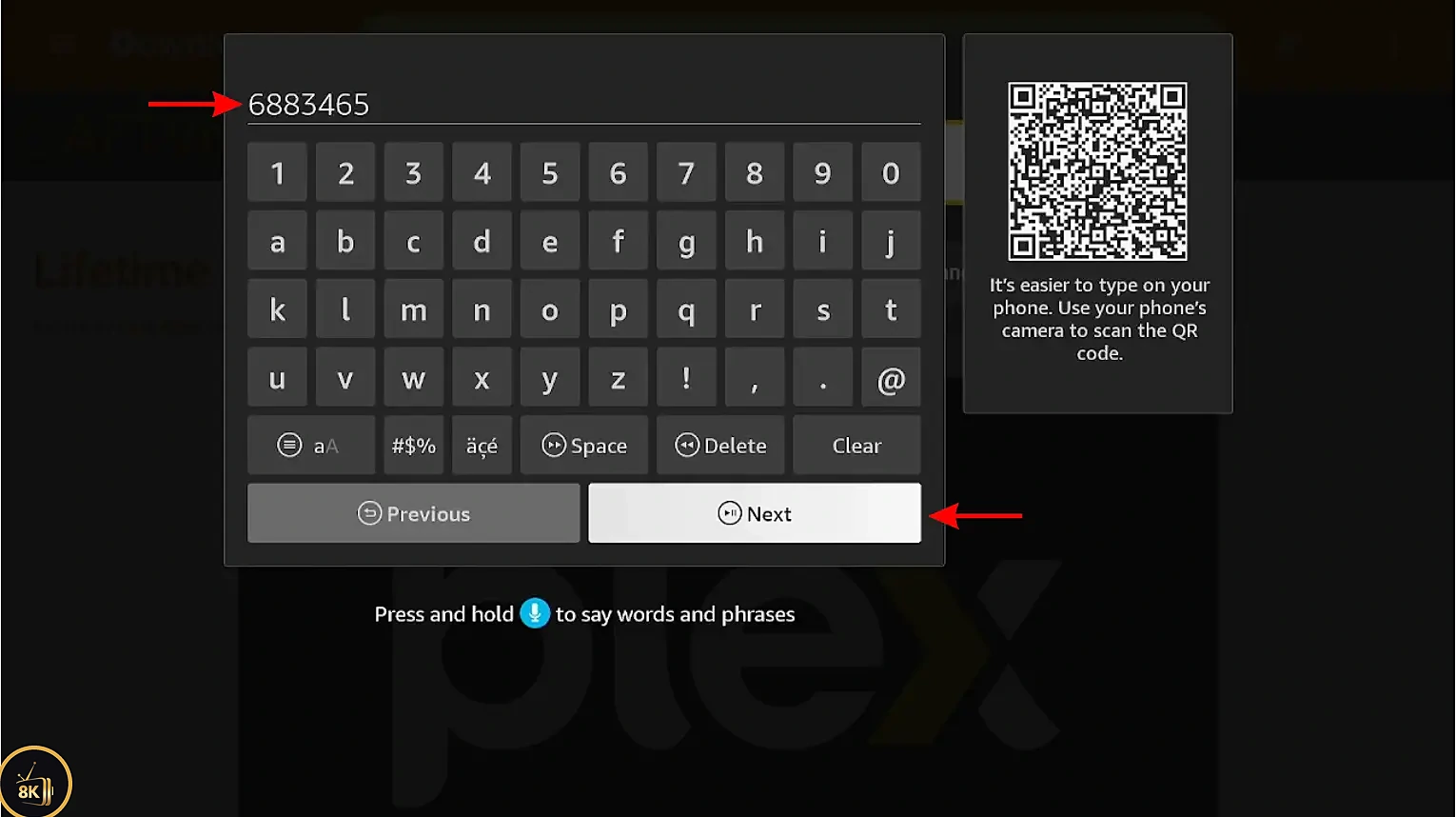
Type the code 6883465 and select Next (or Go).
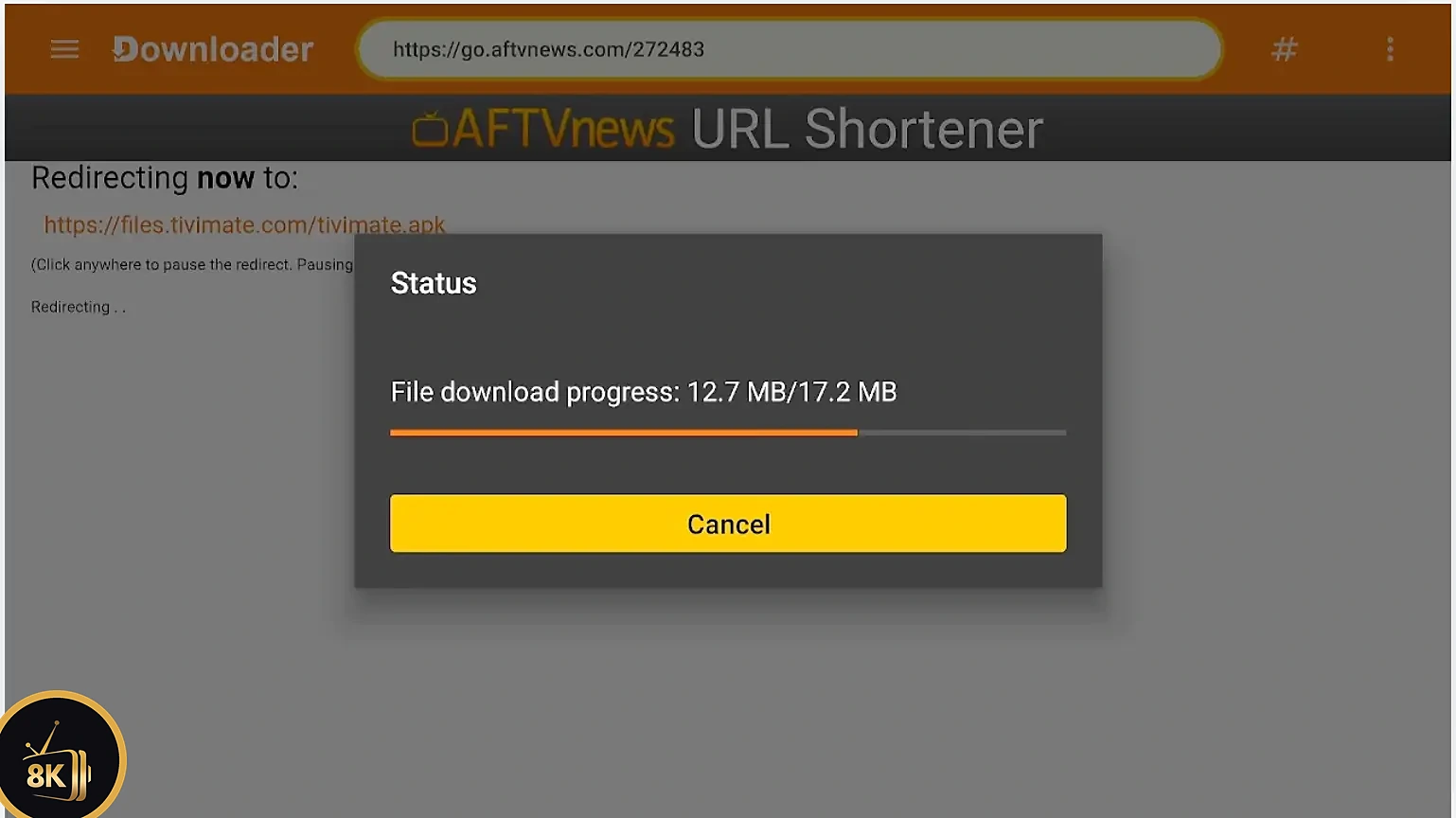
Wait a few seconds while the 8K IPTV App file downloads.
Step 3: Allow Downloader to install unknown apps
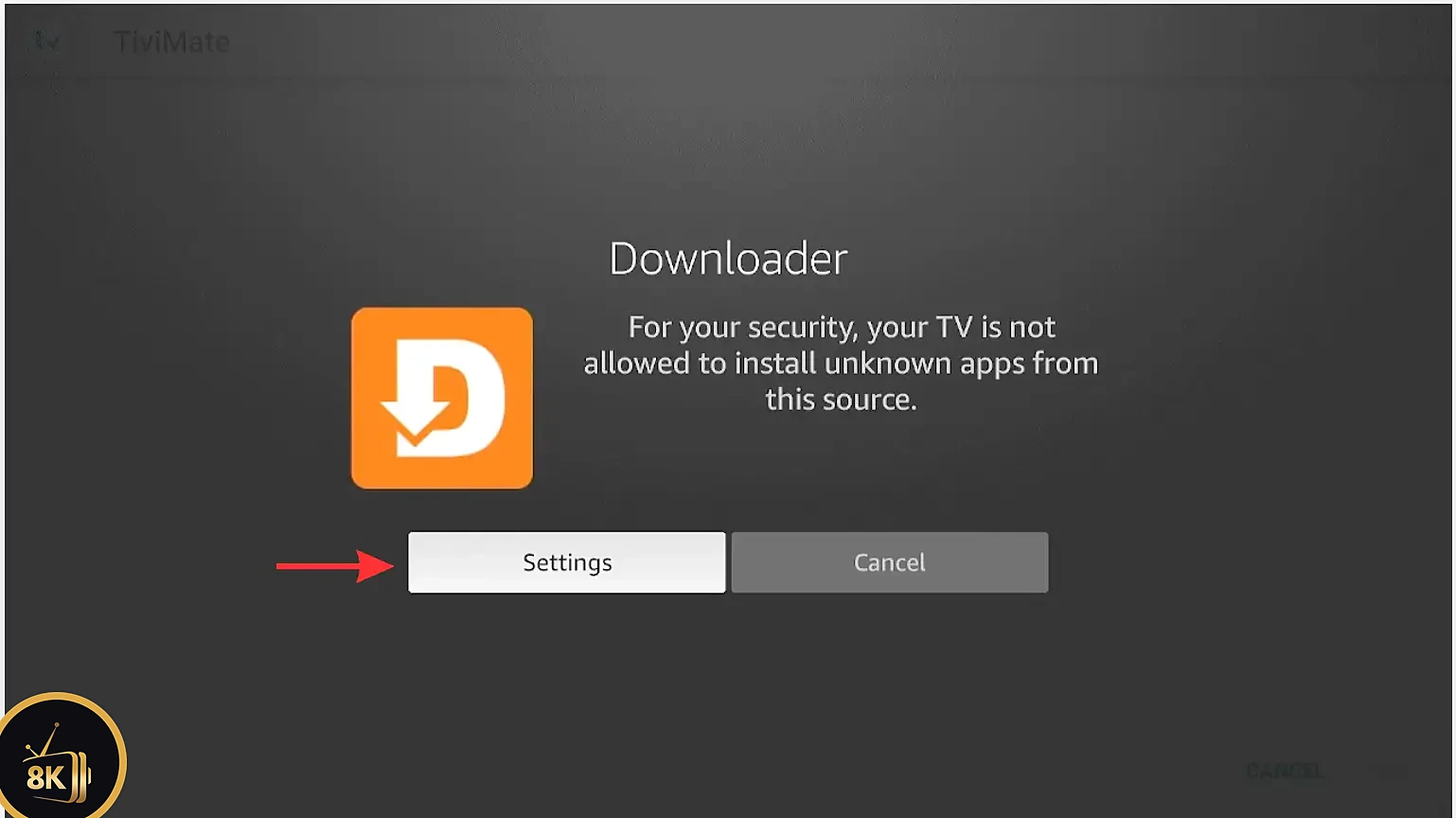
FireStick blocks apps from outside the Appstore by default, so the first time you need to give Downloader permission.
When the security message appears, select Settings.
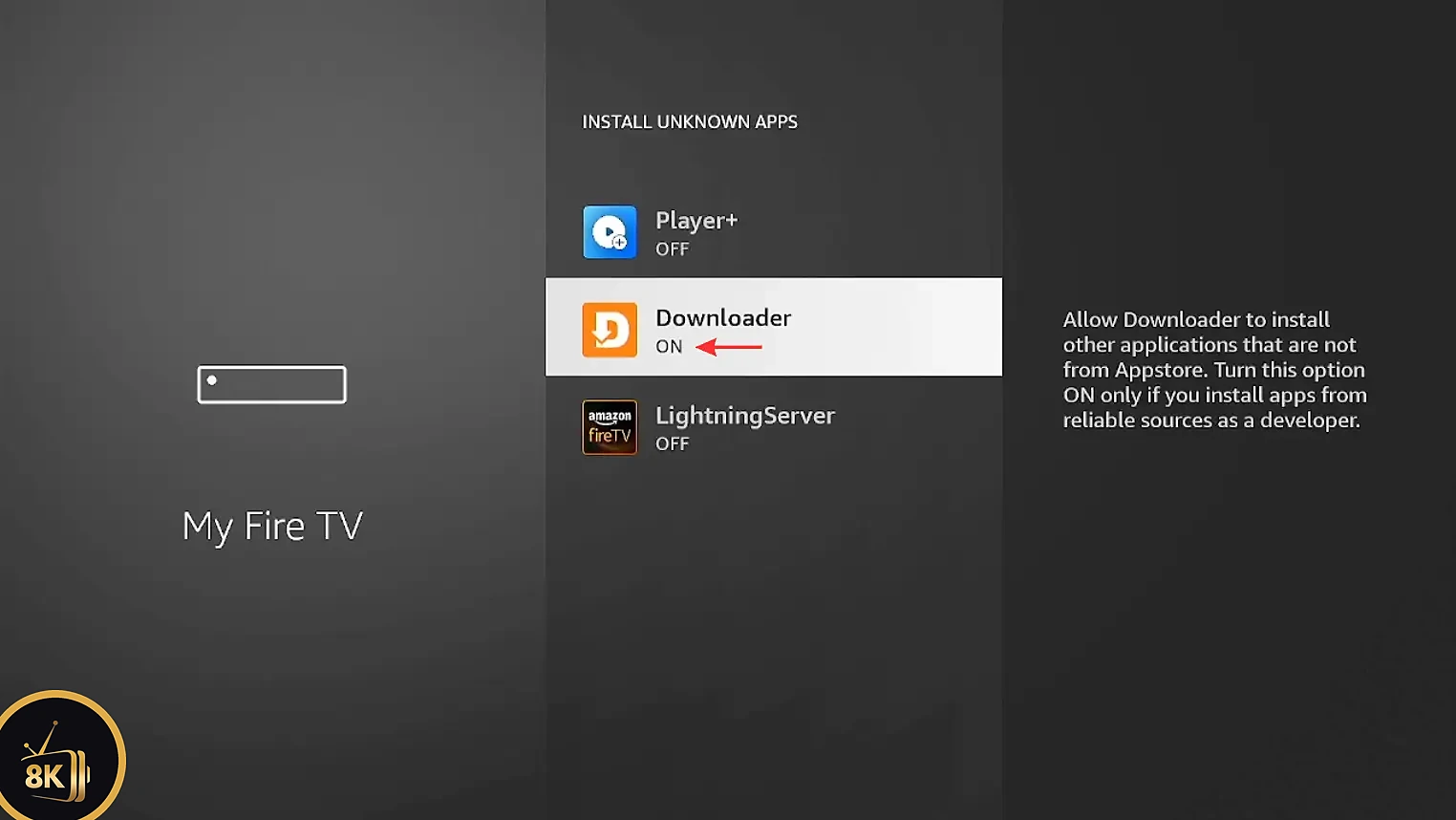
Open Install unknown apps.

Find Downloader in the list.

Switch it from Off to On, then press Back to return to Downloader.
Step 4: Install and Open the 8K IPTV App on FireStick
Back in Downloader, select Install.

Confirm by selecting Install again.
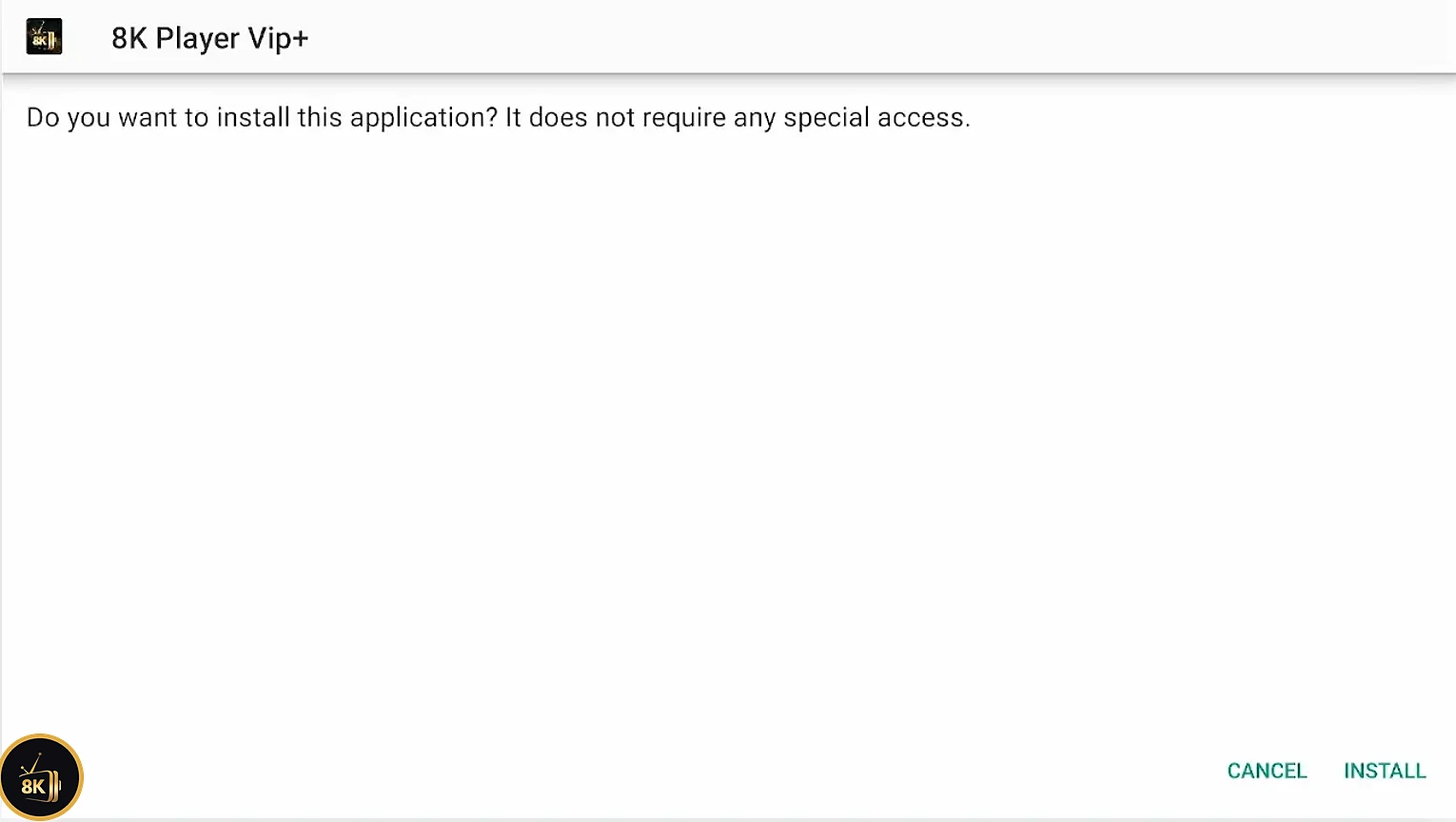
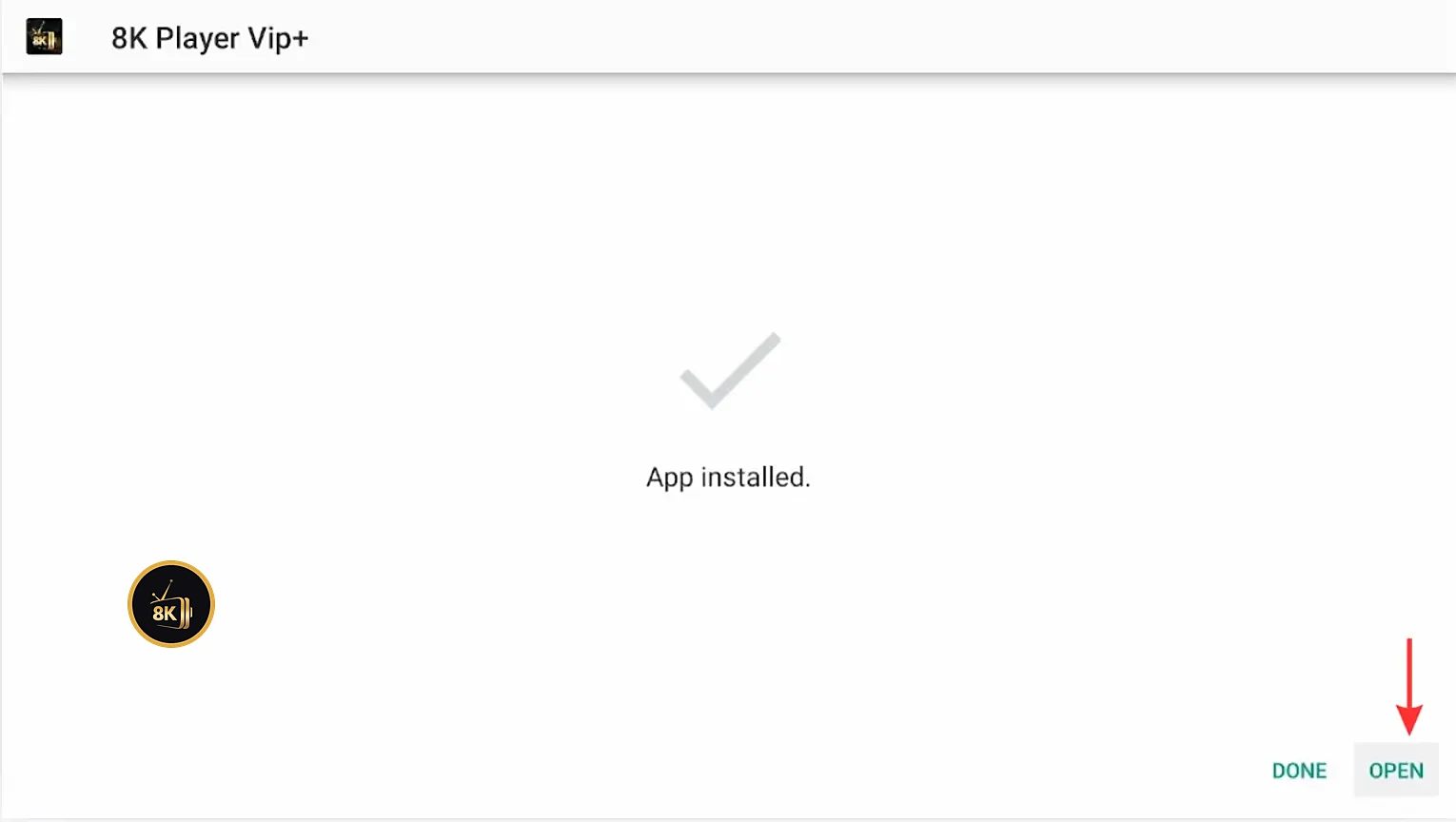
When you see App installed, select Open. You can delete the downloaded file afterwards to free up storage.
Step 5: Get your 8K IPTV login details
Get Your 24H Free Trial
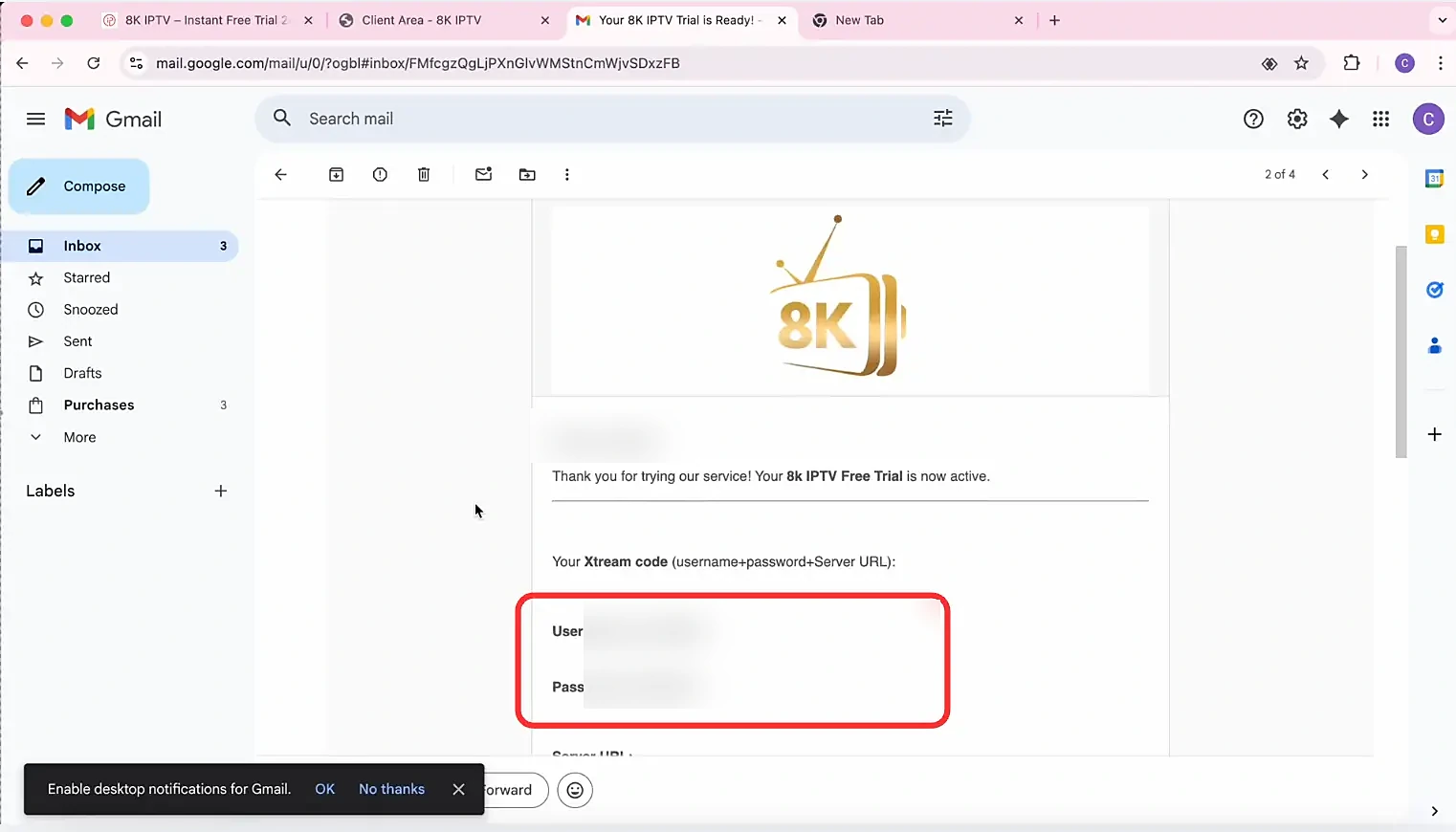
The app is ready, but it needs an IPTV service to play content. Request a free 24-hour trial of 8K IPTV Strong and your username, password and server URL arrive by email, plus an M3U URL. No commitment: just sign up and start streaming.
Instant Activation
Your login details arrive by email, ready to use.
54,000+ Channels
Plus 240,000+ movies and series.
24/7 Support
Help on WhatsApp or by ticket, day and night.
Money-Back Guarantee
7 days on monthly plans, 30 days on longer plans.
Step 6: Add Your Playlist to the 8K IPTV App on FireStick
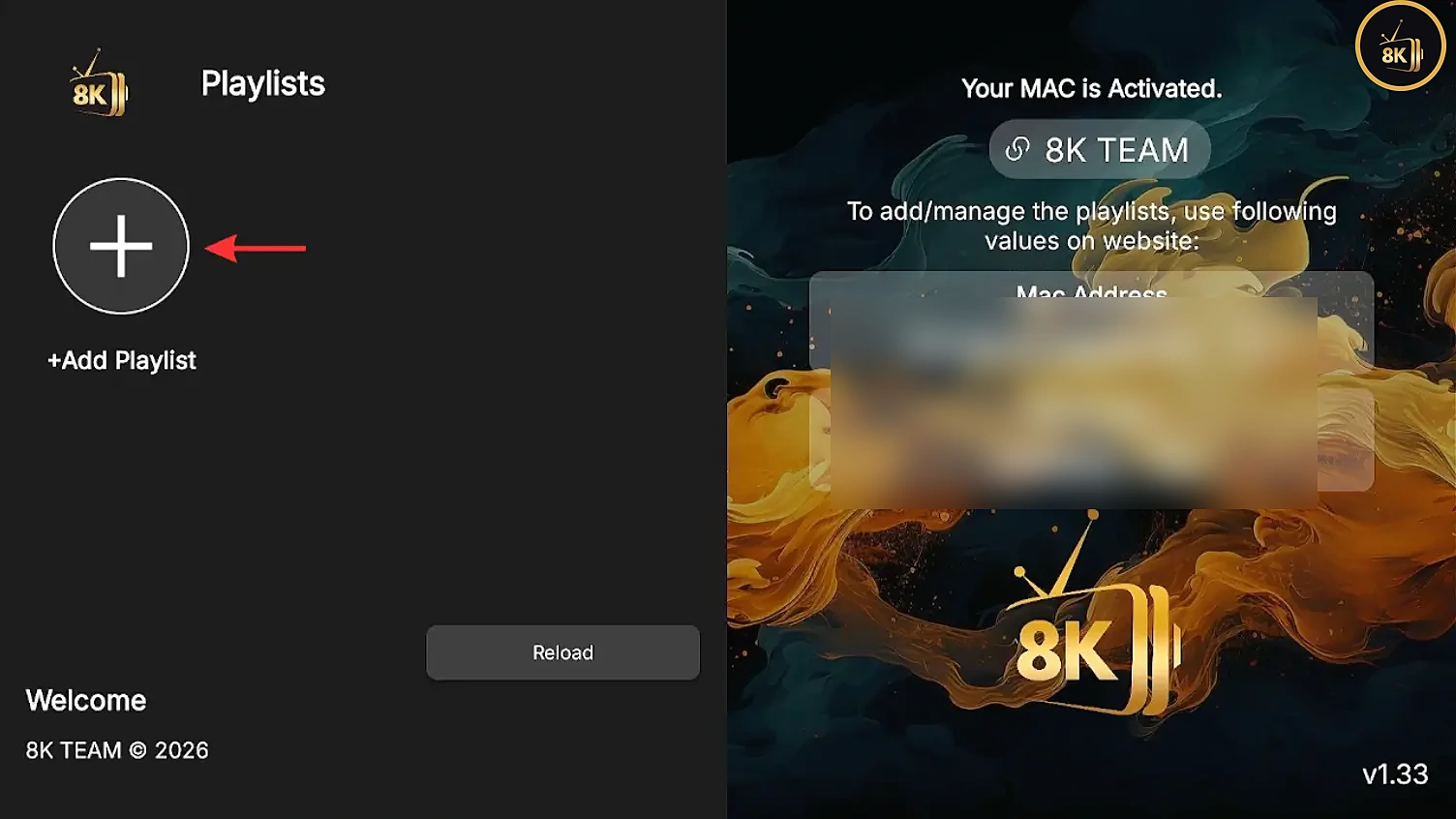
Open the 8K IPTV App on FireStick and select Add Playlist (the + button).
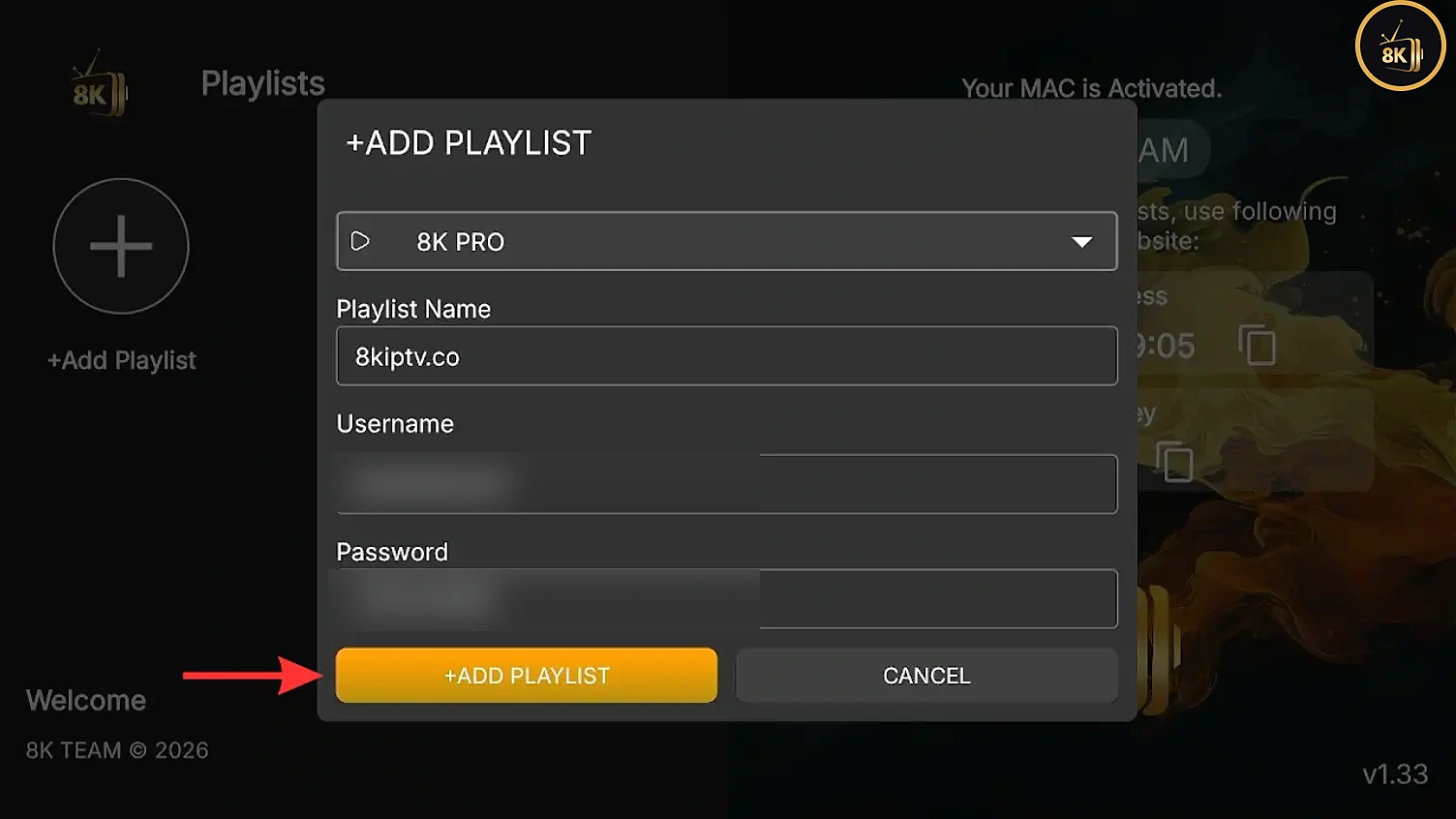
Type a playlist name, then enter your username and password exactly as in your email (they are case-sensitive). Select Add Playlist.
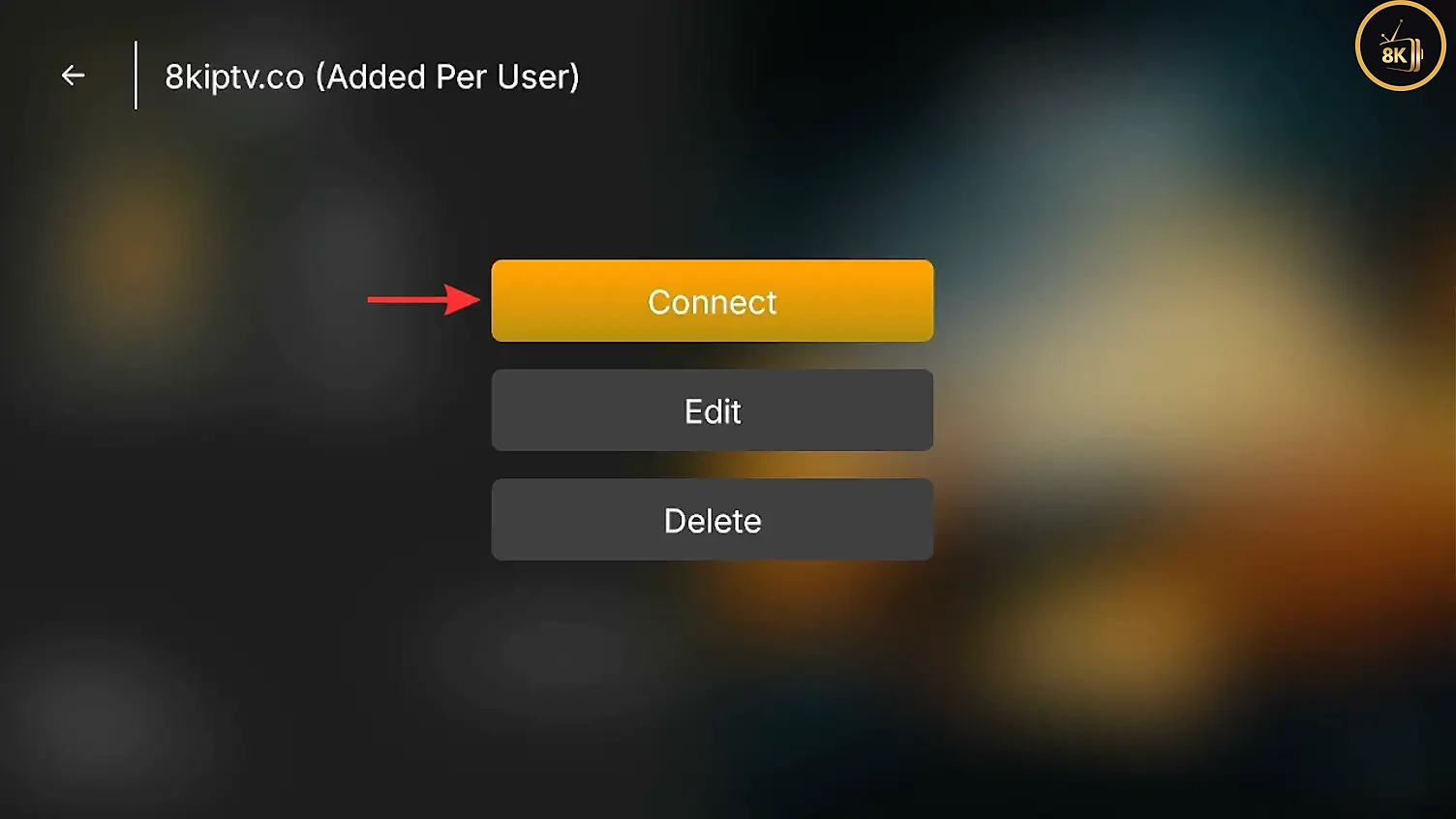
Select your new playlist and choose Connect.
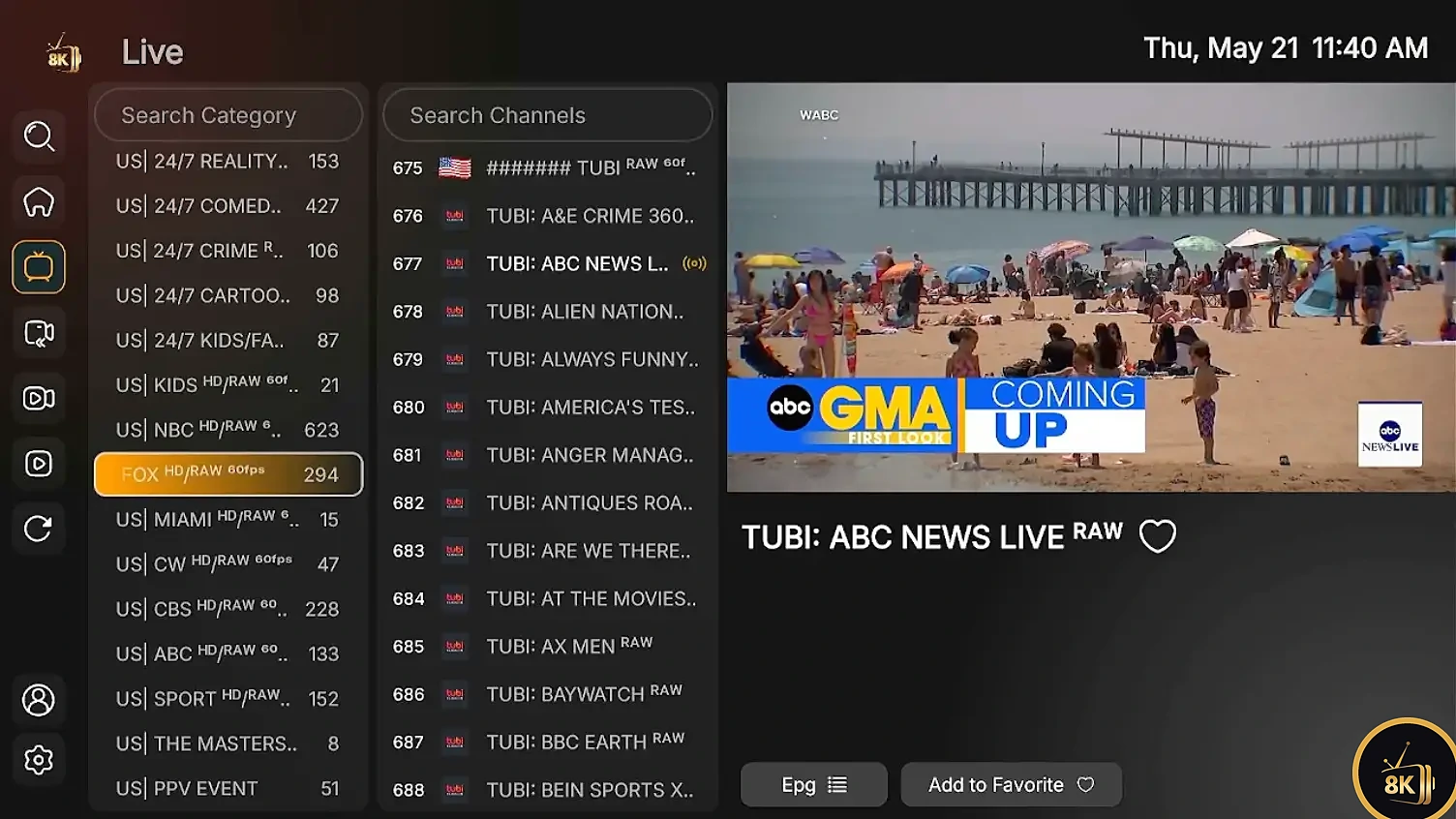
Step 7: Start watching live TV, movies and series
Your channels, movies, series and TV guide now load. Use Search Category and Search Channels to find content fast, press EPG for the program schedule, and select Add to Favorite to keep your top channels one click away.
8K IPTV Strong works with the 8K IPTV App and all the players below.











Tips for smooth streaming on FireStick
Use Ethernet when you can
A FireStick Ethernet adapter gives a steadier connection than Wi-Fi.
Restart regularly
Hold Select and Play on the remote for 5 seconds to restart and clear memory.
Use 5 GHz Wi-Fi
A 5 GHz network near the TV reduces buffering.
Clear the app cache
Settings > Applications > Manage Installed Applications > 8K IPTV App > Clear cache.
Troubleshooting the 8K IPTV App on FireStick
The Downloader code does not work
Check that you typed 6883465 correctly and that your FireStick is online. Restart Downloader and try again.
FireStick blocks the installation
Downloader is not allowed to install apps yet. Go to Settings, My Fire TV, Developer Options, Install unknown apps, and switch Downloader to On.
The playlist will not load or login fails
Re-enter your username and password exactly as shown in your email, with no extra spaces. If you are on a free trial, make sure it has not expired. Still stuck? Contact our support team.
Channels buffer or freeze
Restart your FireStick and router, switch to Ethernet or 5 GHz Wi-Fi, and clear the app cache.
The app crashes or will not open
Go to Settings, Applications, Manage Installed Applications, select the 8K IPTV App, then choose Force stop and Clear cache. If it still fails, uninstall it and reinstall with code 6883465.
8K IPTV App on FireStick vs Other IPTV Players
Here is how the 8K IPTV App on FireStick compares with other popular players. All of them install with Downloader:
| IPTV player | Price | Downloader code | Best for |
|---|---|---|---|
| 8K IPTV App | Free | 6883465 | Quick, simple setup (recommended) |
| IPTV Smarters Pro | Free | 6468112 | Multi-screen and parental controls |
| TiviMate | Paid | 272483 | Advanced TV guide and polished interface |
| IBO Player | Paid, included with 6- and 12-month plans | 511693 | Modern design and smooth playback |
| IBO XPlayer | Paid, included with 6- and 12-month plans | 7947185 | Alternative IBO interface |
| Bob Player | Paid, included with 6- and 12-month plans | 815778 | Simple, lightweight player |
| Smart STB | Paid | 3804692 | MAG-style portal experience |
Setting up another device? Follow our complete IPTV setup guide for Android, Samsung and LG Smart TVs, Apple TV, iPhone, Mac, Windows and MAG boxes.
Frequently asked questions
Yes. The 8K IPTV App is free to download and install on FireStick with Downloader code 6883465. To watch channels, movies and series you only need an active IPTV service, such as an 8K IPTV Strong 24-hour free trial or subscription.
The Downloader code for the 8K IPTV App is 6883465. Enter it in the Downloader app on your FireStick or Fire TV and the app file downloads automatically.
Request a 24-hour free trial or choose an 8K IPTV Strong plan. Your login details (username, password and server URL, plus an M3U URL) are sent to your email, ready to add in the app.
Yes. The 8K IPTV App works on every Amazon FireStick and Fire TV device, including Fire TV Cube, as well as Android TV boxes, Smart TVs running Android and Android phones and tablets.
The most common reason is that Downloader is not allowed to install apps. Go to Settings, My Fire TV, Developer Options, Install unknown apps, and switch Downloader to On. Also make sure your FireStick has enough free storage.
Yes. The 8K IPTV App supports both Xtream Codes API and M3U playlists. Xtream Codes (username and password) is the quickest option and loads the TV guide automatically.
A stable connection matters more than raw speed. As a general guide, plan for about 10 Mbps for HD and 25 Mbps or more for 4K. A wired Ethernet connection gives the most reliable results on FireStick.
The 8K IPTV App on FireStick is a free, fast and beginner-friendly way to enjoy IPTV on FireStick. Test 8K IPTV Strong risk-free for 24 hours, or choose a plan for 1 to 5 devices.
Have a question? Read the 8K IPTV Strong FAQ or contact our 24/7 support.